Welding on Assemblies: Why the Welder Only Sees What the Foreman Assembled
What to weld with what is decided by the foreman, not the welder. How to create an assembly that the welder sees on the terminal, how the system protects against welding the wrong parts, and how to disable this if your process is different.
There are twenty pipes and six plates on the table. Four frames need to be welded from them. Which pipe goes to which frame? If the welder decides this by eye, sooner or later two frames will end up with three uprights, and there won't be enough for the third.
In Oprela, the foreman decides this, and they do it before the welder picks up the torch. The welder receives not a pile of parts, but a ready task: here is the assembly, here are its parts, here is the drawing.
How it works
- The foreman opens the order in the foreman's cockpit, selects the parts, and clicks Combine. This creates an assembly with a code like W-1, W-2, and so on: what to weld with what and how many sets.
- The assembly receives a route "Assembly Welding". It is created automatically, for the type of welding available at the factory.
- When all parts of the assembly are ready, the welder sees it on their terminal and starts work.
Between the first and third steps, the welder doesn't need to do anything. The assembly waits for the parts itself.
How the foreman creates an assembly
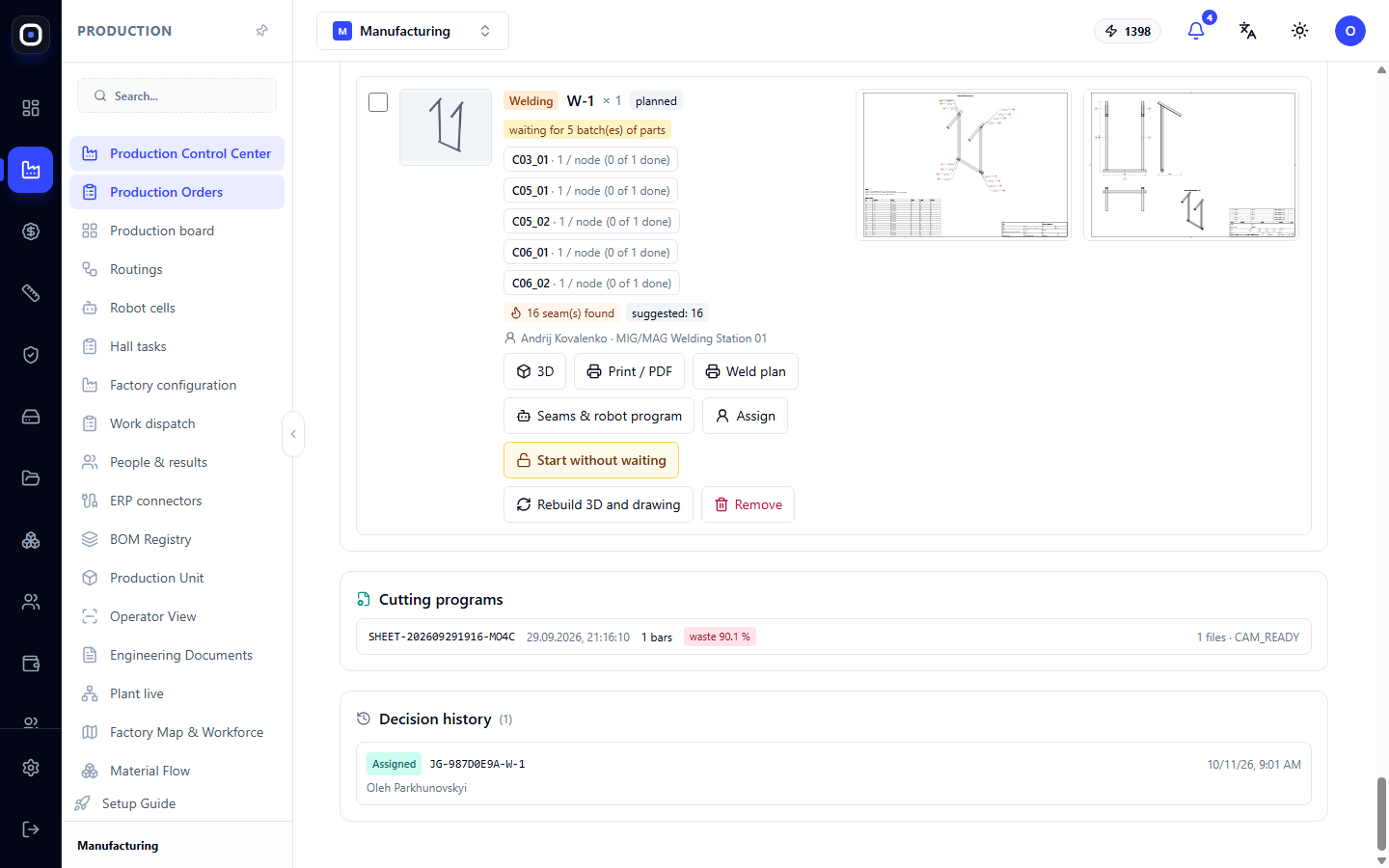
- Open the foreman's cockpit for the order.
- Select the parts of one assembly. It's more convenient to do this on the 3D map: click on the parts directly in the model.
- Click Combine.
- Choose the connection method. For a welded assembly, it's welding, but assemblies can also be created with bolts, rivets, or simple assembly.
- Specify how many pieces of each part go into one assembly and how many assemblies to make. Default values are taken from the order.
The assembly receives a code and its own batch. It can be assigned to a specific welder or robot, like any other batch.
What the system builds automatically
If the order is created from an imported 3D model, the system finds the marked parts in their true positions and builds:
- 3D model of the assembly;
- assembly drawing with views, dimensions, item numbers, and a bill of materials;
- welding plan: an isometric view with highlighted welds, markings according to ISO 2553, and a list of welds.
The system finds the welds itself: these are the contours where a smaller part touches a larger one. It suggests the weld thickness based on the thinner of the walls.
This takes up to a minute. The foreman doesn't need to draw anything.
Assembly of assemblies
Assemblies can be combined further. Two side frames W-1 and W-2 and crossbeams together form a frame. Select the assemblies in the "Assemblies" section and click "Combine" again.
This way, a complex product is broken down into levels: some welders weld frames, another welder or robot connects them into a frame.
What the welder sees
On the terminal or phone, the welder sees:
- only welding work, no cutting or bending;
- only assemblies that the foreman has put together. Each is marked with a fire icon, code, and name, for example, "W-1 · Side Frame";
- a yellow message like "6 batches waiting for welding" if the parts are already ready, but the foreman has not yet assembled them into assemblies.
The last message is useful to both. The welder sees that work will be available soon, and the foreman gets a reminder that parts are lying idle.
Open assembly
When opening an assembly, the welder sees everything needed:
- 3D of the assembly, which can be rotated;
- assembly drawing;
- weld plan;
- "Parts for this task" block: which parts are needed, how many are ready, and where they are located.
They don't search for parts around the shop floor or try to remember what to weld with what.
Who the system considers a welder
A welder is considered an employee who has welding competency recorded, or one whose assigned machines are all welding machines.
If a welder doesn't see their work, first check this in the shop floor personnel register.
Protection
It is impossible to start welding a batch that is not an assembly. Not from the kiosk, not from the main system, and not through the AI assistant.
If someone tries, the kiosk will show: "Welding starts with an assembly — first, the foreman determines what to weld with what."
This is not an over-precaution. What is welded cannot be unwelded. An error at this step costs all parts of the assembly at once.
Robot welding
An assembly can be transferred not to a person, but to a robotic cell. The Welds and Robot Program button on the assembly card opens its welds in the robotic cells section.
There, the technologist confirms the welds, taking into account the welding technology, and a program for the robot is built from the confirmed welds.
If the assembly is rebuilt, the welds are updated, and they need to be confirmed again.
Settings
Two rules in Factory Configuration → Rules define this behavior. They can be set for the entire business, factory, or a specific shop floor.
- "Weld only assemblies from the foreman." Disable if individual parts are welded in the shop floor without assemblies. For example, welding an eyelet to a plate.
- "Welders only see welding." Disable if your welders also cut and bend.
In a small factory where one person does everything, both rules are usually disabled.
Typical workflow
- Parts undergo cutting and bending.
- The foreman combines them into assemblies in the order panel.
- The system builds the model, drawing, and weld plan.
- The foreman assigns assemblies to welders.
- When the parts of the assembly are ready, the welder sees it on the terminal.
- The welder opens the assembly, looks at the weld plan, takes the parts, and welds.
- After completion, the assembly goes for quality control or further along the route.
Frequently Asked Questions
Welder doesn't see the assembly
Not all parts of the assembly are ready. The assembly card indicates how many batches it is waiting for.
Parts are ready, but there's nothing to weld
The foreman has not yet combined them into an assembly. There is a yellow message about this on the welder's terminal.
The foreman made a mistake with the assembly composition
An assembly that has not yet started work can be deleted. Its parts will remain in the order, and the assembly can be re-assembled.
We just need to weld a bracket to one part
There are two ways: create a two-part assembly or disable the "Weld only assemblies from the foreman" rule for the shop floor.
Can welding start if one part is not yet ready?
The assembly waits for all its parts. If the foreman knows that it can start, they remove the wait with a button on the order panel, and this decision is recorded in the history.