Product Check: Can it be costed and where is the data error?
Before calculating the price, the system checks a chain for each item: material, purchase form, price, measured geometry, routing, and time models. How to read the table and what to fix.
The most expensive errors in pricing are not arithmetic. They are in the data: a pipe recorded as a sheet; a thickness of 2 mm instead of 3; a material without a price, for which the system took zero. Such an error quietly passes through the entire calculation and becomes an incorrect price in the customer's quote.
The Product Check section catches this before the calculation. It answers one question, which is also in the title: can this product be costed?
Where to find it
Open Costing Studio and click the first section in the row — Product Check.
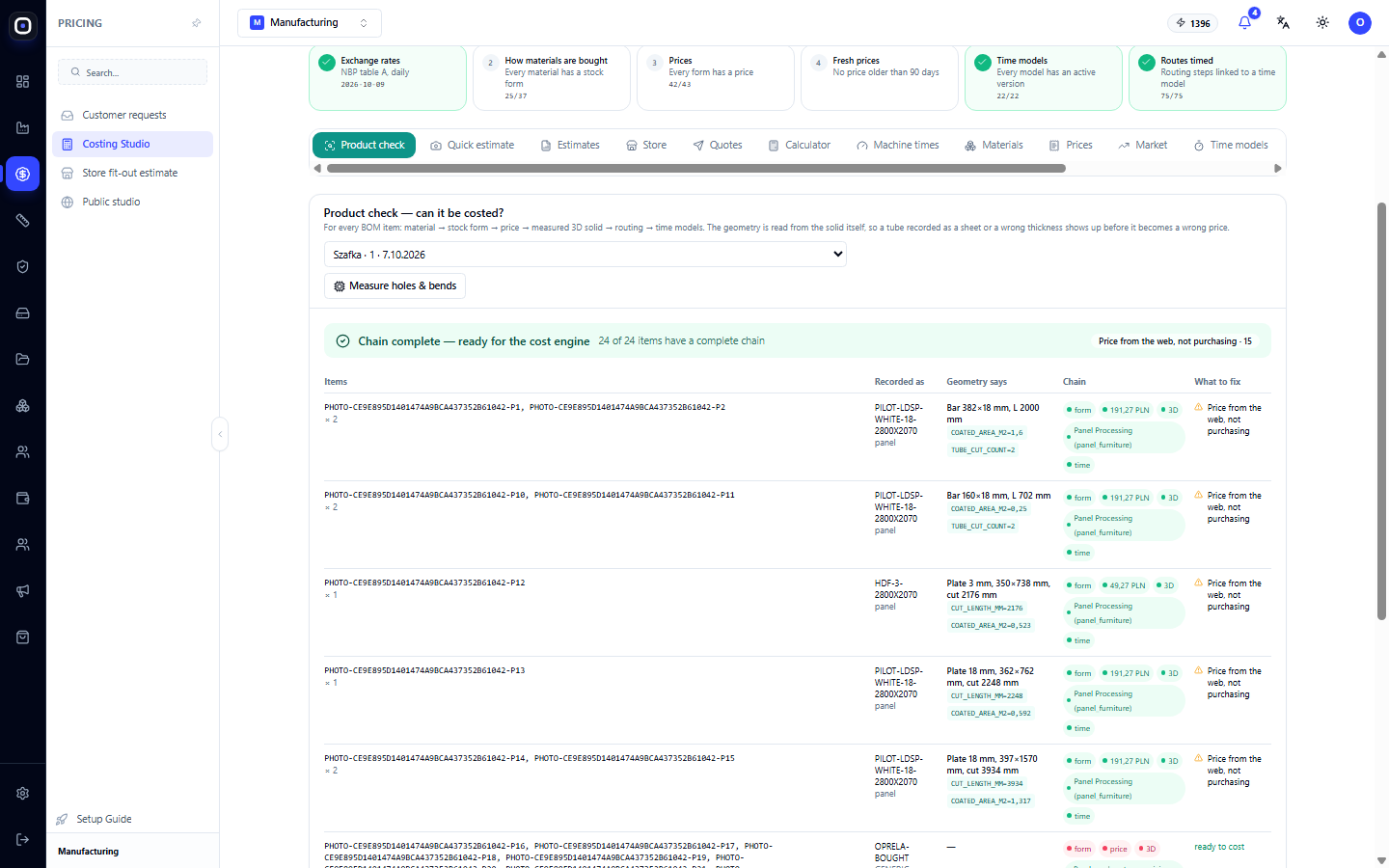
A chain of six links
Under the section heading, what is being checked is described. For each item in the bill of materials (BOM), the system goes through a chain:
material → purchase form → price → measured 3D body → routing → time models
Let's break it down by links.
- Material. What the part is made of. Without material, there's nothing to cost.
- Purchase form. In what form you buy this material: a sheet of a certain size, a pipe of a certain length.
- Price. How much this form costs.
- Measured 3D body. The actual geometry of the part from the model: dimensions, area, cut length.
- Routing. Through which operations the part passes.
- Time models. How long each of these operations takes.
If even one link is missing, the price of that item cannot be calculated. If all are in place, the chain is complete.
Geometry as a witness
The most valuable part of the check is the fourth link. The section explains it this way: geometry is read from the body itself, so a pipe recorded as a sheet, or an incorrect thickness, is visible even before it becomes an incorrect price.
What this means in practice. The BOM says: "2 mm sheet". The system measures the model and sees: it's a hollow profile 40 × 40, two meters long. The record and the geometry do not match. Someone made a mistake, and now it's visible.
A human might not notice such an error in a table of a hundred rows. Geometry always notices.
How to use
Select a product
At the top of the section is a list of products that can be checked. Each row contains the name, quantity, and date. Click on the desired one.
Read the summary
A summary appears above the table:
- a general conclusion, for example, "Chain complete — ready for costing";
- a counter like "24 of 24 items have a complete chain";
- warnings, if any. For example, "Price from the internet, not from purchases · 15": for fifteen items, the price was taken from open sources, not from your actual purchases.
The last warning does not block the calculation, but it is worth knowing about. An internet price is a guideline. For a customer quote, such prices must be confirmed with the supplier.
Read the table
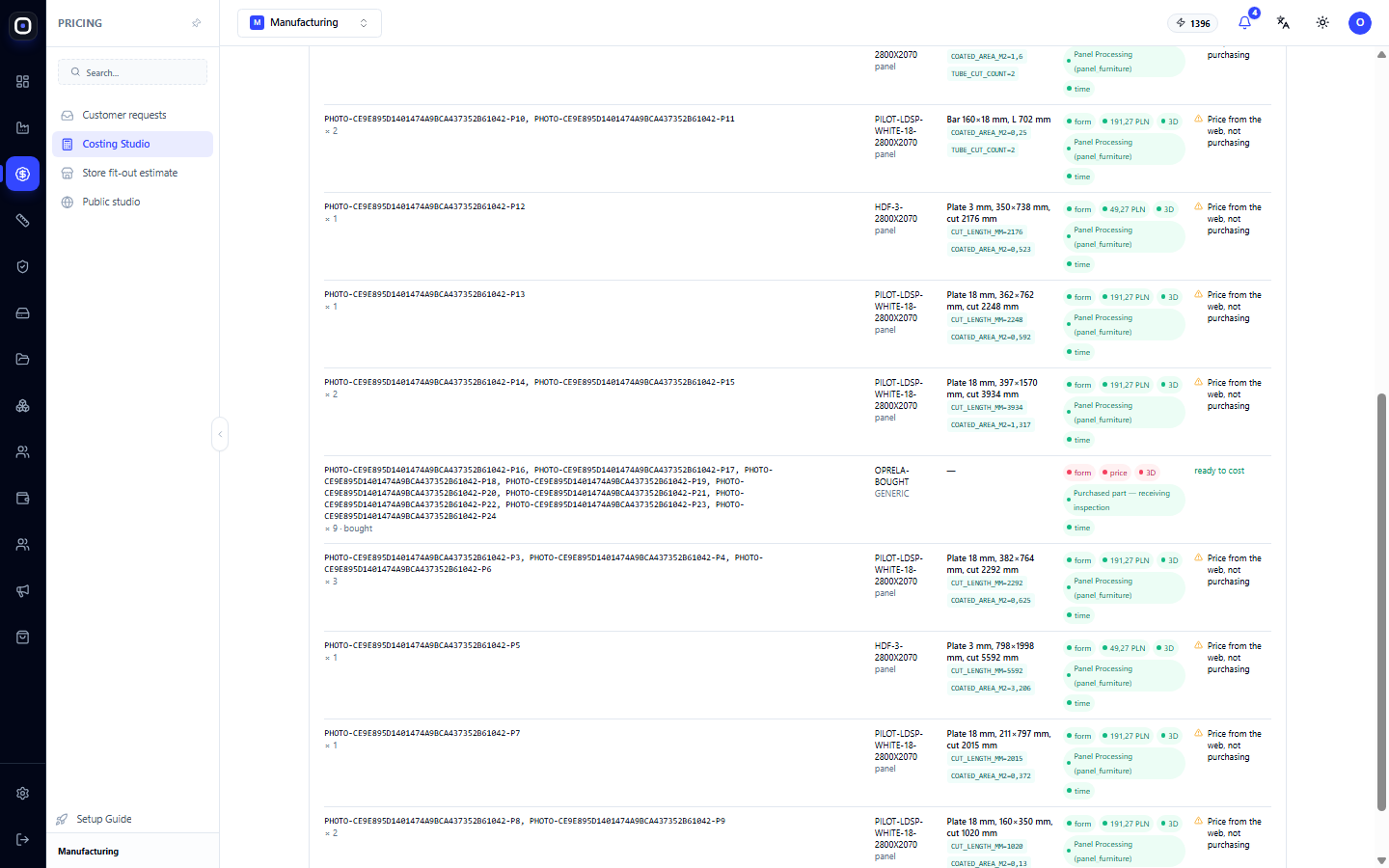
Each row is a group of identical items. Columns:
- Items — part codes and quantity.
- Recorded as — what is specified in the BOM: material and part type.
- Geometry says — what the system measured on the model: for example, "Bar 382 × 18 mm, length 2000 mm", coating area, number of cuts.
- Chain — which links are in place: form, price, 3D, routing, time. The calculated amount is also visible here.
- What to fix — a specific instruction if something is missing or does not match.
Read the table from right to left: first the "What to fix" column. If it's empty, the row is in order.
Compare the two middle columns
"Recorded as" and "Geometry says" should tell the same story. If the first says "panel" and the second shows a bar or pipe, the entry in the BOM is most likely incorrect.
Measure holes and bends
The Measure holes and bends button starts a more detailed measurement of the model. The system counts holes, bends, and other elements that affect processing time.
Without this, drilling or bending time is estimated roughly. After measurement, it is calculated from the actual number of elements.
Typical findings
- No purchase form. Material exists, but it's not specified in what form you buy it. Fixed in the "Materials" section.
- No price. Form exists, price doesn't. Fixed in the "Prices" section.
- Geometry does not match the record. A pipe is recorded as a sheet, or vice versa. Fixed in the BOM.
- No routing. No routing has been issued for the part type. Fixed on the routings page.
- No time model. A routing step is not linked to a time model. Fixed in the "Time Models" section.
- Price from the internet. Not an error, but a reason to check with the supplier.
When to run the check
- Before the first estimate of a new product. Always.
- After changing the BOM. New items may not have a price or routing.
- When the estimate looks suspicious. Too cheap or too expensive usually means a hole in the chain.
- Before quoting a large customer. An error on a large batch costs more.
Typical workflow
- Open Costing Studio → Product Check.
- Select a product from the list.
- Read the summary: how many items have a complete chain.
- Go through the What to fix column from top to bottom.
- Compare "Recorded as" with "Geometry says".
- Click Measure holes and bends.
- Fix what was found in the relevant sections.
- Return and make sure the chain is complete.
- Only now make the estimate.
Frequently Asked Questions
It says "ready for costing", but there's a warning about internet prices
You can cost it. But some prices are approximate. This is enough for an internal estimate, but for a customer quote, they should be confirmed.
"Geometry says" is empty
There is no 3D model for the item. This happens with purchased parts or with products entered without a model.
The record and geometry are different, but the record is correct
This happens when the model is simplified or outdated. In that case, the model needs to be fixed, not the BOM.
The product is not in the list
Products for which a BOM exists are included in the list. First, upload the model via 3D import or make a quick estimate.
How is this different from an estimate?
The check answers the question "can it be costed?". The estimate calculates. First the former, then the latter.